
How to Switch from Wix to WordPress Without Losing SEO (2026)
You built on Wix, the business grew, and now you're hitting the walls - but you're scared of losing your Google rankings if you move. Here is the exact migration playbook: what transfers (and what doesn't), the redirect work that protects your SEO, real costs, and the mistakes that actually kill rankings.
 Ali RehmanFull Stack Web Developer
On this page 8 sections
Wix was the right call when you started: no code, quick launch, one monthly bill. But somewhere between then and now the site stopped keeping up - the blog is clunky, the pages load slower than your competitors', every new feature costs another app subscription, and your developer keeps saying “I can't do that on Wix.” So you're searching “wix to wordpress” at 11pm with one big fear: if I move, do I lose the Google rankings I spent years building?
Short answer: no - if the migration is done properly. I've moved small-business sites off Wix, Squarespace and Webflow onto WordPress, and the pattern is always the same: the sites that kept their rankings followed a boring checklist, and the sites that tanked skipped one of five specific steps. This guide is that checklist - what actually transfers, the redirect work that protects your SEO, what it costs, and exactly where DIY migrations go wrong. (Still deciding between the two platforms? Start with my Wix vs WordPress comparison - this guide is for when the decision is made.)
Should you actually switch? (The honest checklist)
Migration has a real cost in time and money, so let's be honest about whether you need it. Wix in 2026 is genuinely fine for a lot of businesses - the SEO basics work, the editor is pleasant, and for a simple brochure site the walls never get hit. If your site does its job and none of the pain below sounds familiar, staying put is a legitimate choice - as I said in the full comparison, the best platform is the one that doesn't get in your way.
Move when the platform itself is the bottleneck. The searches for “wix limitations” spike for a reason - these are the walls people hit:
- Speed has a ceiling. You can optimize images all day, but you can't touch the server, the code output, or the hosting stack. If slow pages are costing you rankings and conversions, on Wix you can only optimize so far.
- Every feature is a subscription. Bookings, events, members, forms beyond the basics - each is an app with a monthly fee. WordPress plugins are usually free or one-time purchases, which is a big part of the long-term cost difference.
- The blog is an afterthought. Limited layouts, weak category control, no real content structure - painful if content is your traffic strategy.
- You can't get custom work done. Developers can't access server code on Wix. When you need custom functionality - a calculator, a portal, an integration - the answer is either an expensive workaround or “not possible.”
- Lock-in gets more expensive every year. You can't export your site design, and prices rise while the walls stay. The longer you wait, the more content you'll eventually have to move.
One more honest note: if your real problem is that the site looks dated or doesn't convert, a platform switch alone won't fix that - that's a redesign decision, and it's often smart to combine the two projects into one redesign budget instead of paying to rebuild the same site twice.
What actually transfers (and what doesn't)
Here's the part most guides gloss over: Wix has no full-site export. There is no button that hands you your website in a box. What moves, what partially moves, and what gets rebuilt:
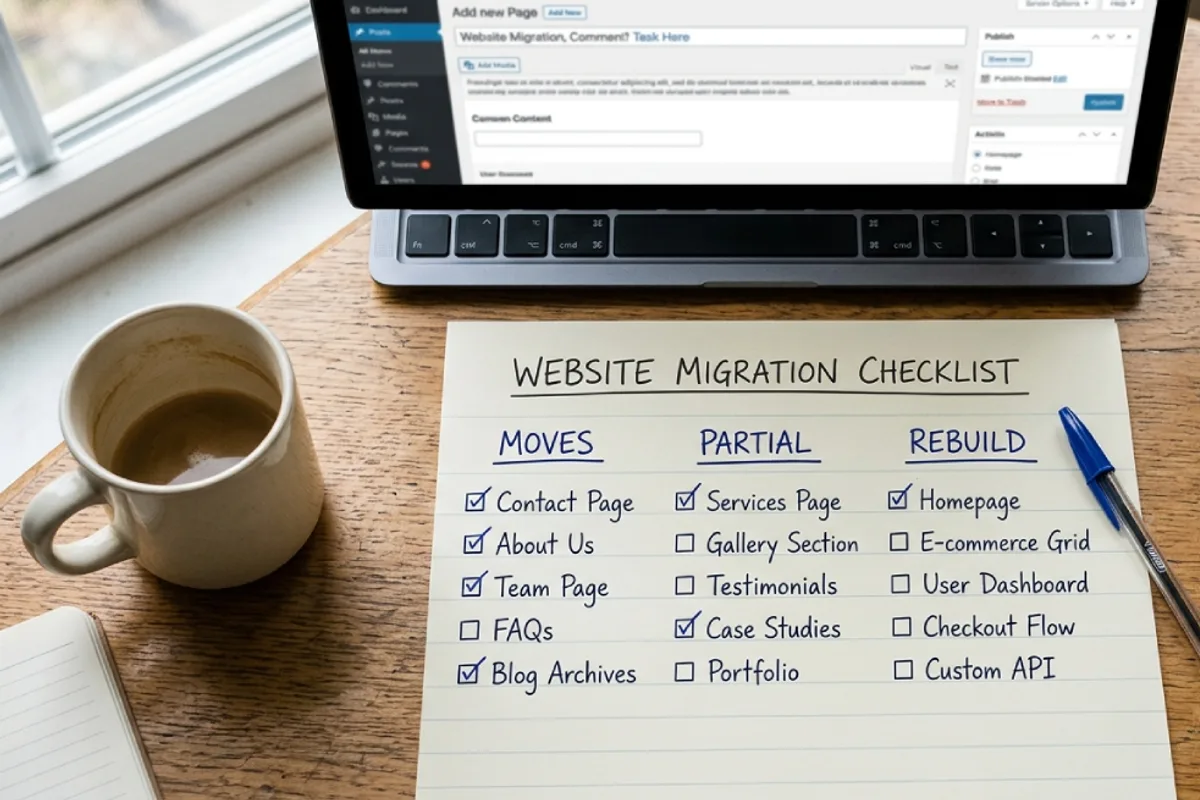
- Your domain - transfers fully. Whether you registered it through Wix or elsewhere, it's yours. You'll either repoint its DNS to your new host or transfer the registration entirely (details below).
- Blog posts - export via RSS. Wix publishes your posts in a feed at
yoursite.com/blog-feed.xml. WordPress imports it natively (Tools → Import → RSS). Titles, dates and body content come across; formatting needs a cleanup pass. - Images - partial, and it bites people. RSS-imported images often still load from Wix's servers (static.wixstatic.com). If you later close the Wix account, those images die. Every image must be re-uploaded to your WordPress media library - plugins can automate pulling external images in.
- Pages - manual rebuild. Copy the text, recreate the layout in your new theme. For a typical 5–15 page small-business site this is the bulk of the work, and also the moment to fix weak copy using a content structure that converts.
- Design - does not transfer. Wix templates are Wix property and Wix code. You'll pick a WordPress theme (or have one built). Treat this as an upgrade opportunity, not a loss.
- Forms, bookings, store - rebuilt with plugins. Contact forms, appointment booking and e-commerce all have mature (often free) WordPress equivalents. Export any customer/order data from Wix first - if you run a store, read the WooCommerce comparison before choosing the shop plugin.
- Email - stays, if you're careful. If your business email runs through Wix (Google Workspace), the mailboxes live on your domain's MX records, not on Wix's website servers. Copy every DNS record before you change anything and email keeps working. Skip this and email dies on launch day - the single most painful (and most preventable) migration mistake.
- SEO equity - transfers via redirects. Rankings belong to URLs. Move the content, map every old URL to its new one with a 301, and Google follows. This is the heart of the whole project, so it gets its own section.
The migration, step by step
The golden rule that makes everything below work: build the new site completely before touching your domain. Your Wix site stays live and untouched while WordPress gets built on a temporary address. Visitors never see a half-finished site, and if anything goes wrong you simply don't flip the switch.
Step 1: Inventory everything (your insurance policy)
Before building anything, document what exists. Open yoursite.com/sitemap.xml on your Wix site and copy every URL into a spreadsheet - this becomes your redirect map later. Screenshot every page. In Google Search Console, export your top pages and queries for the last 3 months - this is your baseline, and it tells you which pages carry your traffic and deserve the most care. Note your Wix blog URL pattern while you're there: posts live under /post/your-title, which will matter in step 5.
Step 2: Set up hosting and WordPress
This is the one genuinely new responsibility WordPress brings: you choose where the site lives. Managed WordPress hosting from a reputable provider runs $5–$25/month and handles updates, backups and security hardening for you - my hosting guide covers exactly what matters and what's marketing fluff. Install WordPress (every decent host does this in one click), and immediately check one setting: Settings → Reading → “Discourage search engines” should be ON during the build and OFF at launch. Remember that checkbox - it returns in the horror-stories section.
Step 3: Import your blog, then rescue your images
In WordPress: Tools → Import → RSS, feed it yoursite.com/blog-feed.xml. Posts arrive with titles, dates and content. Then do the step most DIY migrations skip: pull every external image into your own media library (search the plugin directory for “import external images”). Open your media library and confirm the files are actually there, not hotlinked from wixstatic.com. Re-add alt text where it's missing - it won't survive the feed, and it matters for both accessibility and image search.
Step 4: Rebuild pages - and resist the urge to rewrite everything
Recreate your pages in the new theme: same headlines, same core content, same page titles and meta descriptions (copy them from Wix's SEO panel page by page). This feels tedious, and mid-migration you'll be tempted to rewrite everything while you're in there. Don't - and here's why: change one variable at a time. If you change platform, URLs, design AND content simultaneously and rankings dip, you'll have no idea which change caused it. Migrate first, verify rankings held, then improve content freely from week 3 onward.
Step 5: Build the redirect map (the SEO heart of the project)
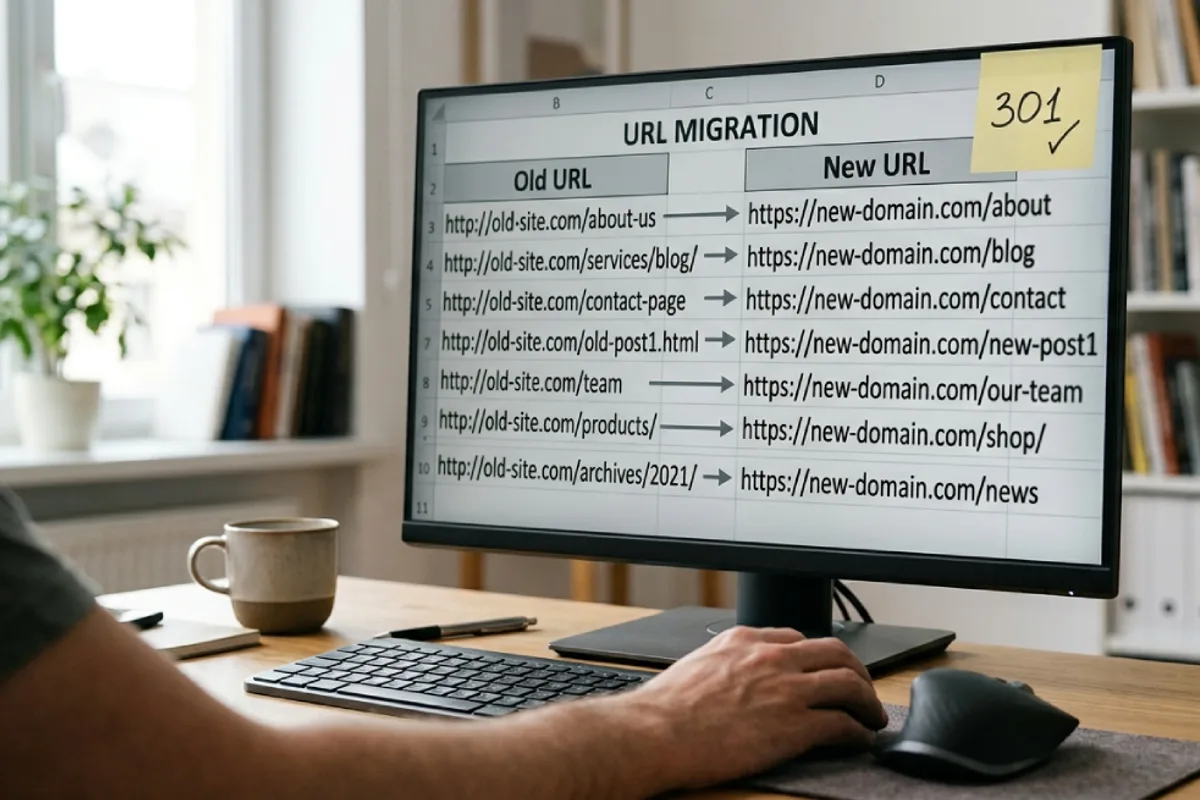
Your URLs will change - Wix structures like /post/5-signs-you-need-a-plumber become cleaner WordPress ones like /blog/5-signs-you-need-a-plumber. Google treats a changed URL as a brand-new page unless you tell it otherwise, and the way you tell it is a 301 redirect: a permanent “this page moved here” signal that passes along the ranking equity the old URL earned. In your spreadsheet from step 1, give every old URL exactly one new destination. Pages that no longer exist should redirect to the closest relevant page - not everything to the homepage, which Google treats as a soft 404.
Here's the detail almost every guide gets wrong: the redirects live on WordPress, not on Wix. Once your domain points at the new host, Wix is out of the picture - any redirect tool inside Wix becomes irrelevant. Set the redirects up on the WordPress side (the free Redirection plugin, your SEO plugin's redirect module, or server config) before launch day, so the moment the domain flips, every old URL already knows where to send visitors and Googlebot.
Step 6: Point the domain (launch day)
You have two options. Repoint (easiest): keep the domain registered where it is and change its DNS - the A record or nameservers - to your new host. Transfer (cleaner long-term): move the registration itself to a proper registrar; note that a domain registered through Wix must be at least 60 days old before it can transfer out (an ICANN rule, not a Wix one), and repointing works fine while you wait. Either way: copy every existing DNS record first - especially MX records - so business email survives, and do the switch at a low-traffic hour. DNS propagates over a few hours; your new host will issue the SSL certificate automatically.
Step 7: Launch-day verification
The moment the new site is live on your domain, run this pass - it's 30 minutes that protects everything: (1) Uncheck “Discourage search engines” and confirm pages aren't noindexed. (2) Spot-check 10–15 old URLs from your spreadsheet - each must 301 to the right new page. (3) Submit the new sitemap (/sitemap.xml) in Search Console - same property, since the domain didn't change; Google's Change of Address tool is only for domain changes, which is not you. (4) Send a test email to your business address. (5) Test the contact form, click every menu item, check the site on your phone. My full launch checklist and technical SEO checklist cover the complete pass, and both apply doubly to a migration.
One more thing: don't cancel Wix yet. Keep the plan for 2–4 weeks as a safety net until rankings and email are verified stable - then cancel (and check the renewal date so you're not surprised).
Will you lose your Google rankings? The honest answer
“Does changing your website affect SEO?” is the question behind every migration search, so here's the straight version. Temporarily, yes - a little. Google has to recrawl your site, follow every redirect, and reconnect its understanding of your pages to the new URLs. For a small site, expect mild fluctuation for 2–6 weeks: a few positions of wobble, impressions dipping then recovering. This is normal, documented behavior - Google's own site-move guidance says signals transfer over a period of weeks for most small and medium sites.
Permanently, no - unless you break something. Rankings that stay down after a migration are almost never caused by “WordPress vs Wix.” They're caused by one of these five, in descending order of frequency:
- 1The noindex checkbox. “Discourage search engines” left on after launch. The site quietly falls out of Google over two weeks while the owner blames the platform. First thing to check if you've already migrated and your site isn't showing up on Google.
- 2Missing redirects. Old URLs returning 404. Every 404'd page is earned equity thrown away, and Search Console's Pages report will show them stacking up. The fix is always the same: complete the redirect map.
- 3Everything-at-once syndrome. New platform + new URLs + rewritten content + new structure in one launch. Google re-evaluates pages whose content changed - combined with new URLs, recovery gets slow and diagnosis gets impossible.
- 4Thinner pages. The Wix page had 800 words and FAQ sections; the rebuilt page has 200 words because “it looks cleaner.” Google notices exactly this. Keep content parity at launch.
- 5Lost internal links. Wix pages linked to each other; the rebuild forgets them. Internal links are how Google understands which pages matter - rebuild them deliberately.
And the flip side, because it's real: done right, most sites end up ranking better within a few months - not because WordPress sprinkles magic SEO dust, but because it removes the ceiling. Faster loads on proper hosting, cleaner markup, full schema control, a blog you'll actually use, and freedom to structure pages around real search intent. “Is WordPress better than Wix for SEO?” - honestly: Wix covers the basics fine; WordPress hands you the tools the basics can't reach. The advantage is what you do with the control.

Your post-launch monitoring routine (10 minutes, twice a week, for 6 weeks): open Search Console → Pages and fix any new 404s with redirects; watch the Performance graph against the baseline you exported in step 1; and click through your top 10 pages like a customer would. Small dips are noise. A steady 3-week decline means something on the list above got skipped - and now you know exactly where to look.
What it costs: DIY vs hiring it out

DIY: roughly $100–$250 in year one, plus your hours. Hosting at $5–$25/month, a quality theme at $0–$60, and every tool in this guide (RSS importer, image importer, Redirection) is free. The honest time budget for a 5–15 page site with a blog: 10–20 hours across setup, rebuild, redirect mapping and verification. Very doable for a patient owner - the redirect map is the only step where a mistake genuinely costs money, so if you skim one section twice, make it step 5.
Hiring: $300–$800 for a typical small-business migration - site rebuilt in a clean theme, blog imported with images fixed, full redirect map, launch verification and a couple of weeks of post-launch monitoring. A migration combined with a redesign runs $800–$2,500 depending on size and custom work - the same ranges as any redesign project, and my guide to developer pricing explains where hourly rates land. E-commerce migrations cost more because product data, orders and payment flows join the party.
If you do hire, screen for migration-specific competence. Ask directly: “How will you handle the 301 redirects?” A good answer names a URL inventory and a mapped redirect plan before any building starts. “We'll rebuild it and it'll be fine” means your rankings are the experiment. The broader vetting playbook is in how to hire a web developer - and for what it's worth, this exact project is one I do regularly: my WordPress development service includes migration with redirect mapping as standard, not as an add-on.
After the switch: what changes in your routine
Fair warning so nothing surprises you: WordPress trades Wix's all-inclusive babysitting for ownership, and ownership comes with three small habits. Updates - WordPress core, your theme and plugins ship updates; on managed hosting most apply automatically, and a monthly 15-minute check covers the rest. Backups - your host should run them daily; verify that's true once. Security - keep plugins few and reputable, use strong logins, and skim the small-business security guide once. If you'd rather never think about any of this, maintenance plans run $30–$150/month - still usually less than a stacked Wix plan with apps.
The payoff column: no more per-feature app fees, a site that can be made genuinely fast (start with the WordPress speed guide once you're settled), a blog worth publishing on, and - the big one - nothing is locked in. Your content, your database, your files: exportable, movable, yours. The next time you outgrow something, it's your hosting plan, not your entire website.
FAQ: quick answers
Can I switch from Wix to WordPress?
Yes - any Wix site can move. There's no full-site export, so blogs come over via RSS import and pages are rebuilt, with 301 redirects preserving your Google rankings. Plan 1–2 weeks for a typical small-business site.
Can I transfer my domain from Wix to WordPress?
Yes. Either repoint its DNS to your new host (fastest - the domain stays registered at Wix) or transfer the registration to another registrar, which requires the domain to be at least 60 days old per ICANN rules. Copy your DNS records - especially email MX records - before changing anything.
Will I lose SEO if I move from Wix to WordPress?
Not if you keep the same domain, 301-redirect every old URL, and keep content substantially the same at launch. Expect minor fluctuation for 2–6 weeks while Google recrawls. Permanent losses come from missing redirects or a leftover noindex setting - both preventable and both fixable.
How long does a Wix to WordPress migration take?
A 5–15 page site with a blog: about a week of part-time work, or 1–2 weeks hired out including verification. The build happens while your Wix site stays live, so there's no downtime - the actual switch is a DNS change that propagates in hours.
How much does a Wix to WordPress migration service cost?
Typically $300–$800 for a straight migration of a small site (rebuild, blog import, redirects, launch checks), or $800–$2,500 when combined with a redesign. DIY costs only hosting (~$5–$25/month) plus 10–20 hours of your time.
Is WordPress better than Wix for SEO?
Wix handles the basics (titles, metas, sitemaps) fine. WordPress wins on everything above the basics: page speed on proper hosting, schema flexibility, content structure, and plugins for any SEO task. The gap isn't automatic - it's the ceiling. Wix limits what's possible; WordPress doesn't.
What happens to my Wix subscription and email after I move?
Keep the Wix plan running 2–4 weeks after launch as a safety net, then cancel before the next renewal. Business email (Google Workspace via Wix) lives on your domain's MX records - preserve those records during the DNS switch and email continues without interruption. If you're setting email up fresh on the new domain, my business email setup guide covers the providers, DNS records and costs.
Bottom line
Moving from Wix to WordPress is a rebuild with a safety procedure, not a leap of faith. Inventory your URLs, build the new site while the old one stays live, import the blog and rescue the images, map every redirect before launch day, flip the DNS, verify in Search Console, and give Google a few weeks to settle. Every horror story you've read traces back to a skipped step on that list - and every smooth migration is just that list, followed in order. The reward is the thing Wix can't sell you at any plan level: a website you actually own, with no ceiling on speed, features or growth.
Written by
Ali Rehman - Full Stack Developer
I build fast, scalable web applications with React, Next.js, Node.js & TypeScript. Have a project in mind? Send me a message and get a written plan with a fixed quote - start here.
More articles by Ali Rehman →