
Ledgerleaf Billing.
Keep the next action, owner and context together.
A completed personal billing-operations application focused on work queues, task ownership and a clearer administrative review experience.
- Project type
- Independent personal build
- Project focus
- Billing operations dashboard development
- Presentation
- Two representative interface visuals
- Viewing mode
- Portfolio case study
A clear purpose.
A considered build.
The challenge
Administrative billing work becomes difficult to coordinate when task state, responsibility and supporting notes are scattered. An overview needs to direct attention to the next action without displaying unnecessary financial or personal records.
The approach
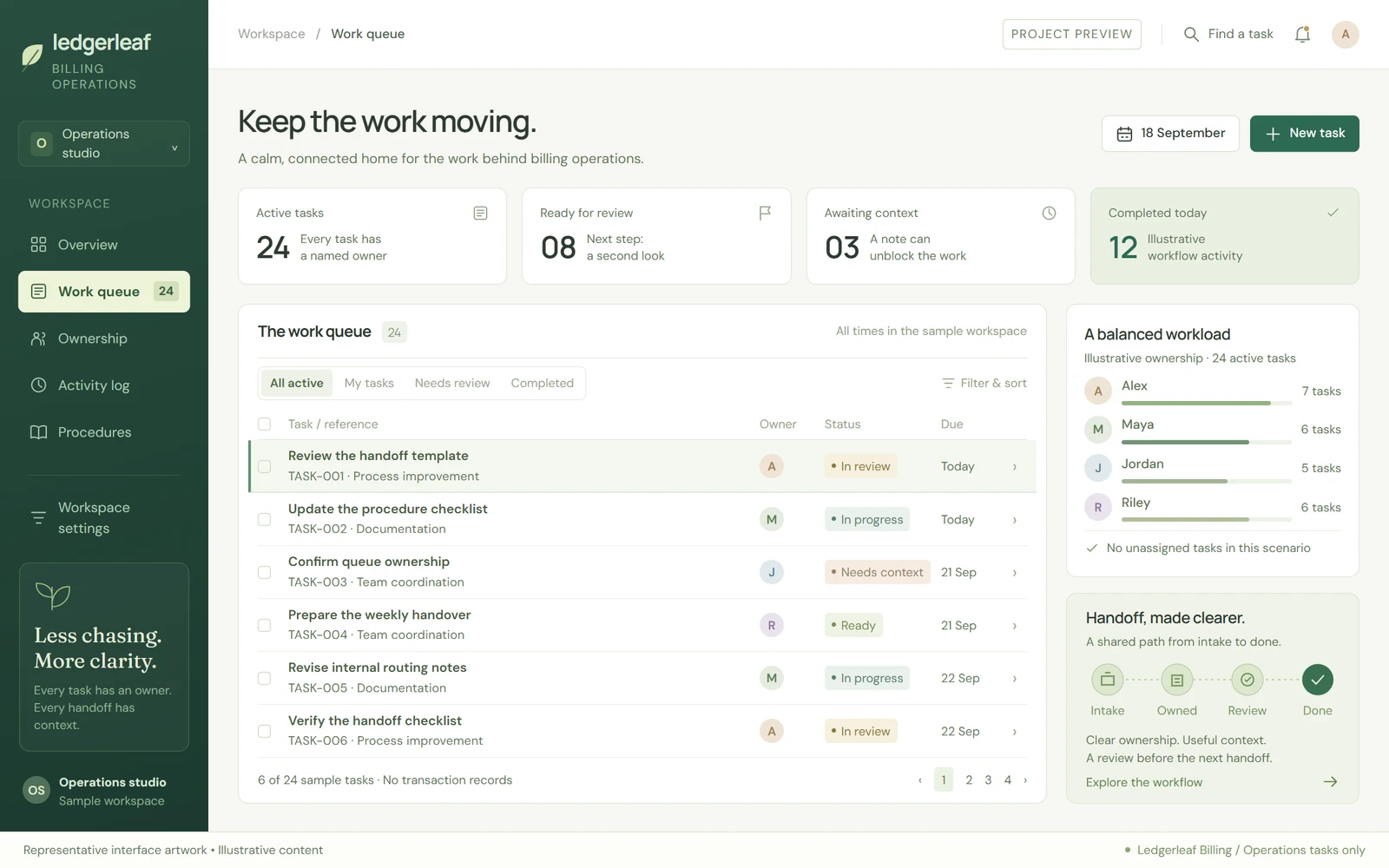
Ledgerleaf presents the workflow through an operations overview and a task-detail view. The case study explains how queue states, ownership and supporting context fit together, using original representative artwork rather than exposing a billing account or client system.
Who the experience is for
Teams coordinating administrative billing operations. The showcase uses synthetic work items and does not represent a payment service or an operating medical-billing provider.
Real development experience. Independent projects.
I have built client websites and web applications as part of an agency team. Those deliveries are separate from the independently branded projects shown here; client code, screenshots and private data are not reused.
A closer look at the project.
Explore the next screen below, or open the gallery to browse all project previews.
Work-queue detail
Illustrative interface · Sample content
The journey,
step by step.
The key experiences and information decisions covered by this case study.
Review the queue
The overview groups work by state and ownership so a coordinator can move from the broader workload to a specific item.
Understand the next action
Task detail places the owner, review state and supporting notes together, reducing ambiguity in the presented handoff.
Keep the review in context
The activity and checklist presentation explains the progress of a sample task without using real claim references or patient records.
More than a
different colour palette.
Forest green, off-white and restrained tabular typography establish a quiet working environment. Queue rows, written state labels and ownership information take precedence over decorative revenue charts. A separate detail view creates room for the notes and context behind a task.
Operations, not revenue theatre
The dashboard highlights work to review rather than displaying invented financial performance or recovery figures.
Ownership is visible
Explicit owner and state labels are given consistent positions in both overview and detail, so responsibility is not hidden in a note.
Privacy in the showcase
Generic task identifiers and illustrative names replace patient details, insurance information and actual transaction records.
The work.
And its context.
This case study presents the project's purpose and interface decisions without requiring a public demo or account access.
These describe the work's subject and design priorities, not a list of unverified technologies or integrations.
- 01SCOPE & CONTEXT
Completed independent application, presented without live access or source-code links.
- 02SCOPE & CONTEXT
The portfolio visuals are representative artwork, not screenshots of a production billing account.
- 03SCOPE & CONTEXT
Claims submission, payment processing and healthcare-system integrations are not claimed here.
- 04SCOPE & CONTEXT
Regulated use requires its own legal, security and compliance review; no certification is implied.
About this project.
Personal implementation, representative visuals and live access are separate things. The case study makes that distinction explicit.
Is this project completed, and can I open the live site?
This is a completed personal project. The public page is a case study, not a live application demo. Live-site URLs, account logins and source-code links are intentionally not published.
How is the project credited?
This is an independent personal implementation by Ali Rehman, presented as a personal case study rather than a client engagement.
What do the project visuals show?
Representative interface artwork with illustrative content, retained from the design process. These visuals are not screenshots of the finished application or evidence of production results.
Can we discuss a similar project?
Yes. Use the contact page to describe your requirements. Any new work would have its own scope and original implementation; client code, confidential data and proprietary assets are not shared.
Planning something similar?
Explore the relevant service scope and a practical planning guide before describing your requirements.
Keep exploring.
All personal projects
Have a project in mind?
Let's discuss an original build around your requirements—not reuse an employer's work.
All previews stay inside this portfolio.